PHP if else statements
Information :-
PHP if else is a conditional statement used to make decisions in a program. It checks whether a condition is true or false and executes code based on the result. If the condition is true, the code inside the if block runs; otherwise, the code inside the else block executes. This helps control the flow of a program and create dynamic behavior. PHP if else statements are commonly used in login systems, form validation, and data processing. They allow developers to handle different situations efficiently and build interactive web applications by responding to user input or specific conditions. Code inside if block execute once's when condition is True and code inside the else block execute once condition false.
Syntax :-
statement ;
if (condition)
{
statement;
statement;
}
else
{
statement;
statement;
}
Why Use PHP If Else Statements?
Ø Make
decisions based on user input
Ø Execute
different code blocks dynamically
Ø Improve
program logic and flexibility
Ø Handle
real-world scenarios like login systems, form validation, etc.
Important of PHP If Else Statements
ü
Helps in decision-making in programs
ü
Makes code dynamic and interactive
ü
Used in almost every PHP application
ü
Essential for building real-world projects
ü
Improves user experience by handling
conditions properly
Features of PHP If Else Statements
- Simple and easy to use
- Supports multiple conditions
- Can be nested (if inside another if)
- Works with comparison and logical operators
- Helps create dynamic web pages
👉 If this helps you:
👍 Like | 🔁 Share | 💬 Comment | 🔔 Follow for more PHP tutorials
PHP if else statements Program Example:-
<html>
<head>
<title>php if else satatement program</title>
</head>
<body>
<h2>php if else statement</h2>
<?php
$age=18;
if($age>18)
{
echo" student is Eligible";
}
else
{
echo" student is no Eligible";
}
?>
</body>
</html>
PHP if else statements Program Output:-
PHP if else statements Program Example :-
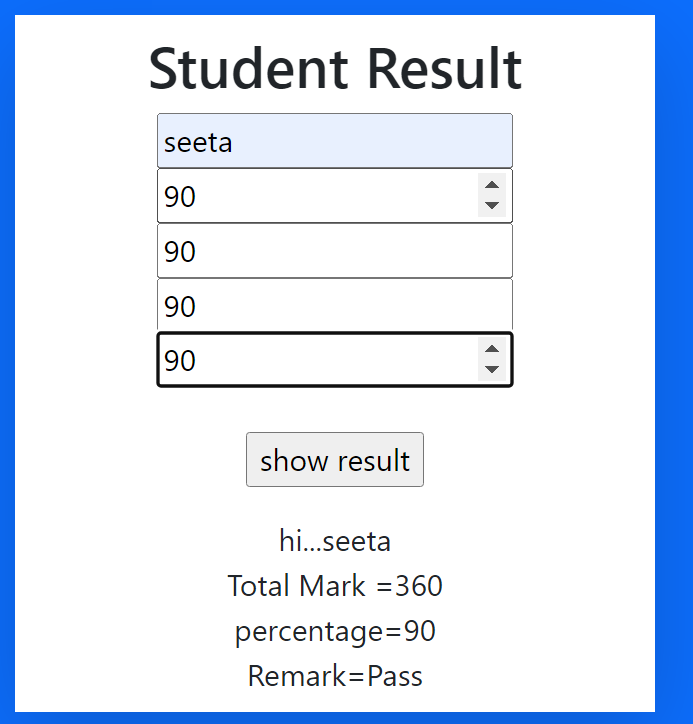
Q. Student result display
<html>
<head>
<title>student marks</title>
<link rel="stylesheet" href="css/bootstrap.css">
</head>
<body class="bg-primary">
<center>
<div class="col-md-4 mt-5 bg-white shadow-lg mx-auto p-2" >
<form action="student-marks.php" method="get">
<h2>Student Result</h2>
<input type="text" name="nm"placeholder="student name" required> <br>
<input type="number" name="mr" placeholder="Marathi" required> <br>
<input type="number" name="eg" placeholder="english" required><br>
<input type="number" name="mt" placeholder="mathematics" required><br>
<input type="number" name="his" placeholder="history" required></br><br>
<input type="submit" value="show result" name="b1"><br>
</form>
<?php
if(isset($_GET["b1"]))
{
/* input type */
$name= $_GET['nm'];
$s1=$_GET['mr'];
$s3=$_GET['eg'];
$s4=$_GET['mt'];
$s5=$_GET['his'];
/* operation */
$total=$s1+$s3+$s4+$s5;
$per=$total/4;
/* output*/
echo "hi..." .$name;
echo "<br> Total Mark =" .$total;
echo "<br> percentage=".$per;
if($s1>=35&& $s3>=35&& $s4>=35 &&$s5>=35)
{
$Remark="Pass";
}
else
{
$Remark="fail";
}
echo "<br>Remark=" .$Remark;
}
?>
</div>
<center>
</body>
</html>
PHP if else statements Program Output:-
FAQ (Frequently Asked Questions)
1]. What is the use of if else in PHP?
It is used to make decisions and execute code based on conditions.
2]. Can we use multiple conditions in if else?
Yes, using logical operators like && (AND) and || (OR).
3]. What is elseif in PHP?
It allows checking multiple conditions in sequence.
4]. Can if else be nested?
Yes, you can write if statements inside another if statement.
5]. Is if else important for beginners?
Yes, it is a fundamental concept every PHP developer must learn.
Conclusion
PHP if else statements are a powerful tool for controlling program flow. They allow developers to create dynamic and interactive applications by making decisions based on conditions. Mastering if else statements is essential for building real-world PHP projects and improving coding skills.




Comments
Post a Comment