ad

Monday, March 4, 2024

PHP operators

PHP operators

PHP operators


PHP operators 

  1. 1] Arithmetic Operators:

    • Addition (+)
    • Subtraction (-)
    • Multiplication (*)
    • Division (/)
    • Modulus (%)
    • Exponentiation (**)
  2. 2] Assignment Operators:

    • Assignment (=)
    • Addition assignment (+=)
    • Subtraction assignment (-=)
    • Multiplication assignment (*=)
    • Division assignment (/=)
    • Modulus assignment (%=)
  3. 3] Comparison Operators:

    • Equal (==)
    • Identical (===)
    • Not equal (!= or <>)
    • Not identical (!==)
    • Greater than (>)
    • Less than (<)
    • Greater than or equal to (>=)
    • Less than or equal to (<=)
  4. 4] Logical Operators:

    • AND (&& or and)
    • OR (|| or or)
    • NOT (! or not)
    • XOR (exclusive OR) (xor)
  5. 5] Increment/Decrement Operators:

    • Increment (++)
    • Decrement (--)
  6. 6] String Operators:

    • Concatenation (.)
    • Concatenation assignment (.=)
  7. 7] Array Operators:

    • Union (+)
    • Equality (==)
    • Identity (===)
    • Inequality (!= or <>)
    • Not identical (!==)
  8. 8] Ternary Operator:

    • Syntax :-
  9. (condition) ? expression1 : expression2;

it works:

  • 1] If the condition evaluates to true, the expression1 is executed.
  • 2] If the condition evaluates to false, the expression2 is executed.
Related Post :-

php program to print alphabet pattern F

php if statements

create menu card in html code table format

PHP data Type

 Variable Data Type in PHP

PHP data type


1] PHP String :-

        Represents a sequence of characters.

Example: $name = "seeta";

2] PHP Integer :-

Represents whole numbers without decimal points.

Example :- $number = 100;

3] PHP Float :-

Floating point numbers or Doubles

Represents numbers with decimal points.

Example :- $float_number = 9.7;

4] PHP Boolean :-

Represents true or false values.

Example: true;

5] PHP Array :-

Represents a collection of elements, each identified by a key.

Example: $colors = array("red", "green", "blue");

6] PHP Object :-

Represents instances of user-defined classes.

Example:

class Car { public $color = "blue"; public $make = "Toyota"; } $car = new Car();

7] PHP NULL :-
Represents a variable with no value.
Example: $variable = null;
  1. 8] PHP Resource :-
  2. Represents a special variable that holds a reference to an external resource.
  3.    A common example of using the resource data type is a database call.                         It is the storing of a reference to functions and resources external to PHP.

  4. Variable data type
    Example

    /* data type  variable */
    <?php
    $no1=10;
    $no2=85.99;
    $name1='aman';
    $name2="aishwarya";
    $status="false";
    $student=array("payal","aishwary");

    VAR_DUMP($no1);
    var_dump($no2);
    var_dump($name1);
    var_dump($name2);
    var_dump($status);
    var_dump($student);
    ?>


    variable data type
    Output

    variable data type/output


    Related Post :-

php program to print alphabet pattern A

Advantage and disadvantage of javascript

forgot password form

Sunday, March 3, 2024

PHP variable


PHP variable

PHP variable


1] variables are declared /represent with a dollar sign ($) by the variable name.

2] A variable is a container to store to add values() of

Type :-

1] int

2] float

3] string

4] boolean

5] array

6] object

7] resources etc.

3] Variable names must begin with a letter or underscore character, followed by any combination of letters, numbers, or underscores.

Rules Variable Declaration


1] variable name must start with any Alphabet or symbol , variable name.
2] Can not start with a number.
eg :- $s1 = correct , $1s = wrong

3] PHP variable name are case sensitive .
   EG- $a ,$A, are two different variables.

PHP variable
Program :-

<?php
$no1=10;
$no2=5;
echo $no1+$no2;
?>

PHP variable
Output :-

php variable /output


Related Post :-

world wide web and internet 

how to comment in html code

how to create login form in php

Saturday, March 2, 2024

PHP introduction

 What is the PHP

PHP introduction


  ஃ  It was originally created by Danish-Canadian programmer Rasmus Lerdorf in 1993 and             released in 1995.

1]  PHP stands for Hypertext Preprocessor.

2] It is a widely-used open-source server-side scripting language.

3] primarily designed for web development and can be embedded into HTML.

4] PHP scripts are executed on the server, generating dynamic web page content.

5] PHP code can perform tasks such as collecting form data, interacting with databases,

managing sessions, and creating cookies.

6] It is commonly used alongside MySQL or other database management systems to
create dynamic websites and web applications.

8] php is powerful and flexible language supported by a large community of developers worldwide.

Why php use

1] platform independent

2] open source

3] runs multiple operating system

e.g :- window, linux, kill , dos

4] Free to download and edit.

What can php do ?

1] php can generate dynamic page content.

2] php can create open ,read ,write, delete, and close files on server.

3] collect form data.

4] send data receive cookies.

5] add delete , modify, your database.

6] control user access.

7] php can encrypt data

How to run PHP file


ஃ writing the php code Visual Studdio code, notepad, Eclipse etc..

1] first xampp server download.

2] than select the xampp folder click on htdocs file.

3] htdocs folder click than create your program folder.

ஃ you prrogram save

4] php program must save .php extension.

5] run to the php program xampp control panel click


XAMPP Control Panel


downloads XAMPP SERVER VISIT LINK

https://www.apachefriends.org/

ஃ Than click Apache Module click start button

ஃ Than click on Admin Button.

5] select folder of you project name.

6] Than select the you program name.

7] Program execute the XAMPP Server.

8] Run to the any browser.(show to the output).

Note :- php file is placed inside the htdocs folder. you want to run. open any web

browser and enter "localhost/demo.php" and press enter. than program is run

Php Syntax :-


<? php
.......
....
...

?>

PHP Program :-


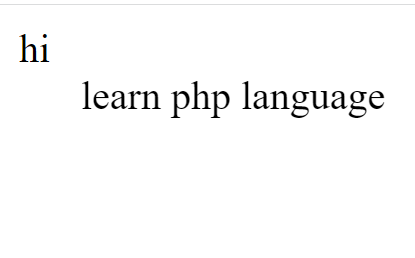
<?php
echo " hi";
?>
<?+php
echo "<marquee>learn php language </marquee>" ;
?>

php Output:-

php basic  program/output


Related Post :-

php program print square number pattern

html button tag

line break html