ad

Sunday, March 3, 2024

PHP variable


PHP variable

PHP variable


1] variables are declared /represent with a dollar sign ($) by the variable name.

2] A variable is a container to store to add values() of

Type :-

1] int

2] float

3] string

4] boolean

5] array

6] object

7] resources etc.

3] Variable names must begin with a letter or underscore character, followed by any combination of letters, numbers, or underscores.

Rules Variable Declaration


1] variable name must start with any Alphabet or symbol , variable name.
2] Can not start with a number.
eg :- $s1 = correct , $1s = wrong

3] PHP variable name are case sensitive .
   EG- $a ,$A, are two different variables.

PHP variable
Program :-

<?php
$no1=10;
$no2=5;
echo $no1+$no2;
?>

PHP variable
Output :-

php variable /output


Related Post :-

world wide web and internet 

how to comment in html code

how to create login form in php

Saturday, March 2, 2024

PHP introduction

 What is the PHP

PHP introduction


  ஃ  It was originally created by Danish-Canadian programmer Rasmus Lerdorf in 1993 and             released in 1995.

1]  PHP stands for Hypertext Preprocessor.

2] It is a widely-used open-source server-side scripting language.

3] primarily designed for web development and can be embedded into HTML.

4] PHP scripts are executed on the server, generating dynamic web page content.

5] PHP code can perform tasks such as collecting form data, interacting with databases,

managing sessions, and creating cookies.

6] It is commonly used alongside MySQL or other database management systems to
create dynamic websites and web applications.

8] php is powerful and flexible language supported by a large community of developers worldwide.

Why php use

1] platform independent

2] open source

3] runs multiple operating system

e.g :- window, linux, kill , dos

4] Free to download and edit.

What can php do ?

1] php can generate dynamic page content.

2] php can create open ,read ,write, delete, and close files on server.

3] collect form data.

4] send data receive cookies.

5] add delete , modify, your database.

6] control user access.

7] php can encrypt data

How to run PHP file


ஃ writing the php code Visual Studdio code, notepad, Eclipse etc..

1] first xampp server download.

2] than select the xampp folder click on htdocs file.

3] htdocs folder click than create your program folder.

ஃ you prrogram save

4] php program must save .php extension.

5] run to the php program xampp control panel click


XAMPP Control Panel


downloads XAMPP SERVER VISIT LINK

https://www.apachefriends.org/

ஃ Than click Apache Module click start button

ஃ Than click on Admin Button.

5] select folder of you project name.

6] Than select the you program name.

7] Program execute the XAMPP Server.

8] Run to the any browser.(show to the output).

Note :- php file is placed inside the htdocs folder. you want to run. open any web

browser and enter "localhost/demo.php" and press enter. than program is run

Php Syntax :-


<? php
.......
....
...

?>

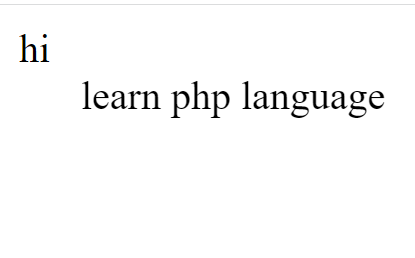
PHP Program :-


<?php
echo " hi";
?>
<?+php
echo "<marquee>learn php language </marquee>" ;
?>

php Output:-

php basic  program/output


Related Post :-

php program print square number pattern

html button tag

line break html

Sunday, February 25, 2024

css border property


CSS box model-Border property

1] The border-top property in css is shorthand property that allows.

2] Set the width, style, and color of the top border of an element in a single declaration.

3] Simplifies the process of styling the top border by combining several individual border


       properties :-

       1] border-Top

       2] border-Bottom

      3]  border-right

      4] border-left


1] border -top  Property :-


     1] border-top-width  :-  1] property sets the width of the top border.

                                            2]  specify the width using values like pixels and percentages.


    2] border-top-style  :-    1] property sets the style of the top border of an element.

                                         2] choose various styles as solid, dashed, dotted, double etc   


     3] border-top-color :-  1] property sets th color of the top border.

                                         2] specify the color using color name RGB values etc.


css box model-Border property

  Example :-

<html>
    <head>
        <title>Padding </title>
        <style>
h3
{
    background-color: rgb(228, 239, 233);
    color: rgb(221, 56, 202);
}
.main
{
   border-top :2px solid ;
   border-top-width :2px;
   border-top-style:dotted;
   border-top-color:crimson;
}
</style>
</head>
<body>
<h3>css box model :- css padding property<br>(padding-top ,
padding-left, padding-right, padding-bottom )</h3>
 <p class="main">Learn for the https://webdesigningtheory.blogspot.com/
</p>
</body>
</html>


css box model-Border property

 Output :-

css box model-Border property \output


Related Post :-

html unordered list

html head tag

how to create a product page

Saturday, February 24, 2024

css box padding property


 CSS Box  -Padding Property


 1]    padding is the space between the content and border of the element.

 2]  It provides internal spacing within the element


   CSS Properties 

        1]  padding-top

       2]  padding-right

       3]  padding-bottom

       4]  padding-left


CSS Box Model - padding

EXample :-


<html>   
<head>
        <title>Padding </title>
        <style>
h3
{
    background-color: rgb(228, 239, 233);
    color: rgb(221, 56, 202);
}
.main
{
    border: 2px solid black;
    padding-right:100px;
    padding-right:100px;
    padding-top:52px;
    padding-bottom:52px;
    color:rgb(255, 0, 106);
}
</style>
</head>
<body>
<h3>css box model :- css padding property<br>(padding-top , padding-left,
padding-right, padding-bottom )</h3>
 <p class="main">Learn for the https://webdesigningtheory.blogspot.com/ </p>
</body>
</html>

CSS Box Model - padding

Output :-

CSS Box Model - padding/ output


Related Post :-

php program to print alphabet pattern H

php syntax

html radio button

Tuesday, February 20, 2024

CSS Box margin property


  CSS Box Model -Margin Property


 1] css box model is a fundamental concept in web design that describes                                                         how elements on a webpage

 2] css box model consists of components including content, margin, border, padding .

  CSS box model explain


 1] Margin :-

             1] Margin property is use create space around html element.

            2]  Margin property CSS  individual sides top, right, bottom, left   

                                     Margin 

              1] Margin-top :-    used space to set left margin  element.

              2]  Margin-right :- use space to set left margin  element.

              3] Margin-left :- used space to set left margin of element.

             4] Margin-bottom :-  used space to set bottom margin element.

CSS Box Model -Margin

Example :-

<!DOCTYPE html>
<html>
<head>
    <title> css box model "margin"</title>
<style>
    h3
    {
        background-color: rgb(0, 255, 110);
        color: rgb(212, 48, 19);
    }
    .main
    {
        margin-left:100px;
        margin-right:100px;
        margin-top:52px;
        margin-bottom:52px;
        color:blue;
    }
    </style>
</head>
<body>
    <h3>css box model :- css Margin property<br>(margin-top ,
margin-left, margin-right, margin-bottom )</h3>
     <p class="main">Learn for the https://webdesigningtheory.blogspot.com/ </p>
</body>
</html>

CSS Box Model -Margin :-

Output:-

CSS Box Model -Margin /output


Related Post :-

audio tag in html

css box margin property

php program to print triangle pattern