ad

Tuesday, April 9, 2024

PHP While loop


PHP While loop

PHP While loop


 Information :-

1] PHP while loop can be used to return from the same process as the loop.

2] The while loop repeats a block of code until the condition is FALSE. 

3] Exit the body loop when the condition is FALSE.

4]
This
 loop should be used if the number of iterations is unknown.

5] Element
 loop is also called Entry check loop because 
the condition is checked          before entering the loop body. 

6] This means diagnosing the condition first. If the condition is true,           the code block is executed.


Syntax :-


Flowchart :-

PHP while loop /output


PHP While Loop 

Example :-

<!DOCTYPE html>
<html lang="en">
<head>
    <meta charset="UTF-8">
    <meta name="viewport" content="width=device-width, initial-scale=1.0">
    <title>Document</title>
</head>
<body>
<?php
/*decending order in php*/
 $no =10;
 while ($no>0)
 {
    echo $no."<br>";
    $no --;
 }

 /**10,9,8,7,6,5,4,3,2,1 */


?>

</body>
</html>


PHP While Loop 

OUTPUT :-


Wednesday, April 3, 2024

PHP switch statement

 switch statement in PHP

PHP switch statement


1] switch case is use in menu driven programming.

2] The value of the switch expression is calculated once's then this
    value is match  which case in switch block---- if there is match
    associated case is executed.

3] use break keyword to transfer keyword outside they switch block
    after case execution.

4] switch case value is the expression is case sensitive.

5] The switch statement in PHP is an effective construct that lets you carry out various operations depending on various circumstances.
 
6]  It's especially helpful when you have to assess several scenarios and run various code blocks according to the first real situation that appears. Now let's see how it functions.

      Syntax :-

statement 
switch (expression/value)
{
  case value:  
 statement;
  statement;
     break; 

  case value: 
 statement;
 statement;
    break;

      default :   
 statement;
 statement;
}         


PHP switch statement 
    
    Program

<?php
$no1=20;
$no2=5;
$choice=4;
switch($choice)
 {
    case 1 : $result =$no1+$no2;
     echo"Addition =".$result;
     break;
     case 2 : $result =$no1-$no2;
     echo"Substraction =".$result;
     break;
     case 3 : $result =$no1*$no2;
     echo"Multiplication =".$result;
     break;
     case 4 : $result =$no1/$no2;
     echo"division =".$result;
     break;
     default : echo "wrong choice";
 }
?>

PHP switch statement 
Output :- 

PHP switch statement  Example /output


Related Post :-

php program to print triangle pattern

how to create a footer page design

css text align

Tuesday, April 2, 2024

PHP else if ladder

 PHP else if ladder

PHP else if ladder


PHP else if ladder :-


     PHP If ladder is a specific kind of nested if statement, where nesting only occurs in the else part. This statement is useful when an action needs to be chosen depending on a range of values.
      PHP, an “else if ladder” (also known as a “chain of if-else statements”) is a construct that allows you to evaluate multiple conditions in sequence. It’s particularly useful when you want to check different conditions one after the other and execute specific code blocks based on the first true condition encountered.


    Syntax :-

statement;

if (condition)

{
statement;
statement;

}
 else if (condition)
      statement;
     statement;
}
else
{
statement;
statement;
}


PHP else if ladder

Example :-
<!DOCTYPE html>
<html lang="en">
<head>
    <meta charset="UTF-8">
    <meta name="viewport" content="width=device-width, initial-scale=1.0">
    <title>Document</title>
    <link rel="stylesheet" href="css/bootstrap.css">

</head>
<body class="bg-primary">
    <div class="bg-white col-md-4 mx-auto mt-5 p-4">
<h2>Positive Negative or zero number check </h2>
<form action="else-if-ladder-p-n.php" method="get">
   
    <input type="number" name="no" class="form-control" required>
</form>

<?php
$score = 85;

if ($score >= 90) {
    echo "Grade: A";
} elseif ($score >= 80) {
    echo "Grade: B";
} elseif ($score >= 70) {
    echo "Grade: C";
} elseif ($score >= 60) {
    echo "Grade: D";
} else {
    echo "Grade: F";
}
?>

</div>
</body>
</html>


PHP else if ladder :-
Output :-


else if ladder output


Friday, March 29, 2024

PHP if else statements


  PHP  if else statements

PHP  if else statements


Information :-

Code inside if block execute once's when condition is True  and

code inside the else block execute once condition false.


Syntax :-

 statement ;

if (condition)

{

statement;

statement;

}

else

{

statement;

statement;

}


Example:-

<html>
    <head>
        <title>php if else satatement program</title>
    </head>
    <body>

        <h2>php if else statement</h2>
        <?php
        $age=18;
       
        if($age>18)
        {
            echo"  student is Eligible";
        }
        else
        {
            echo" student is no Eligible";
        }
        ?>
       
</body>
    </html>


 Output:-

PHP  if else statement program  /output

Example :-

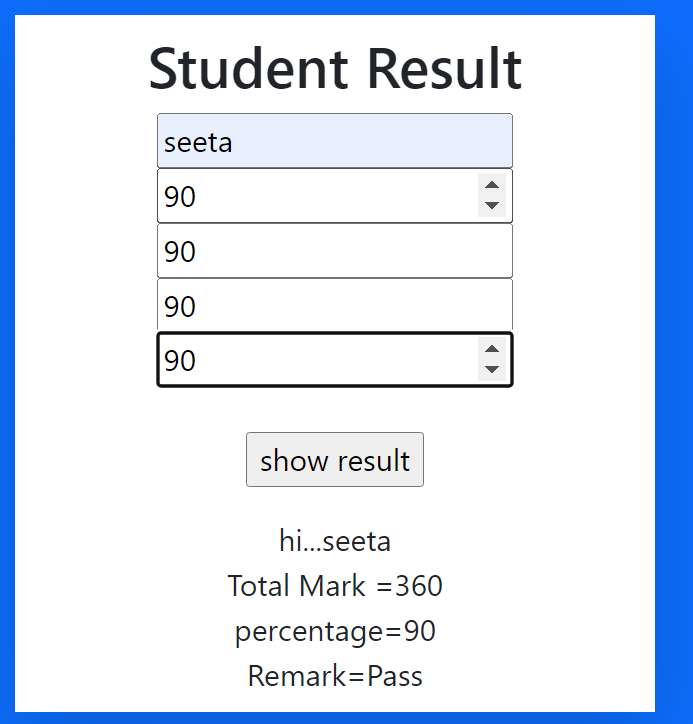
Q. Student result display 

<html>
    <head>
    <title>student marks</title>
    <link rel="stylesheet" href="css/bootstrap.css">
</head>
    <body class="bg-primary">
        <center>
        <div class="col-md-4 mt-5 bg-white shadow-lg mx-auto p-2" >
        <form action="student-marks.php" method="get">
         <h2>Student Result</h2>
        <input type="text" name="nm"placeholder="student name" required> <br>
         
            <input type="number" name="mr" placeholder="Marathi" required> <br>
           <input type="number" name="eg" placeholder="english" required><br>
            <input type="number" name="mt" placeholder="mathematics" required><br>
            <input type="number" name="his" placeholder="history" required></br><br>
            <input type="submit" value="show result" name="b1"><br>

        </form>

                <?php
                if(isset($_GET["b1"]))
                {
                /* input type */
            $name= $_GET['nm'];
            $s1=$_GET['mr'];
            $s3=$_GET['eg'];
            $s4=$_GET['mt'];
            $s5=$_GET['his'];
            /* operation */
            $total=$s1+$s3+$s4+$s5;
            $per=$total/4;
            /* output*/
            echo "hi..." .$name;
            echo "<br> Total Mark =" .$total;
            echo "<br> percentage=".$per;
                     if($s1>=35&& $s3>=35&& $s4>=35 &&$s5>=35)
                     {
                        $Remark="Pass";
                     }
                     else
                     {
                        $Remark="fail";

                     }
                   
                     
                     echo "<br>Remark=" .$Remark;
                }
                ?>
                </div>
            <center>
            </body>

    </html>


Output:- 

PHP  if else statement program  /output

Related Post :-

php for loop

css id selector

html address tag

Saturday, March 9, 2024

PHP if Statements

PHP if statements


PHP if statements


if statements inside they if block is execute the once them codition is true.

Syntax :-
      statement ;
          if (condition) 
        
         {
          /*block of code */

         }

PHP if Statements 
 
Example :-
Q] Accept name of student from user and show student name in same page.

<html>
   
    <form action="collect_data_student.php"
method="get">
    <label> Enter name</label><br>    
    <input type="text" name="snm" require>
<br><br>
    <input type="submit" value="show" name="b1"
>
   <?php
        if (isset($_GET["b1"]))
        {
                $name=$_GET["snm"];
                echo " <br> hi :-". $name;
        }
   ?>

</form>
</html> 


PHP if Statements 
Output :-

php if statement /output

Example 

2]   Accept price and amount the user from and calculate bill .price and bill amount person 
      get 10% discount of total bill amount 5000. 


    <html>
        <head>
    <title>calculate the bile </title>
</head>
    <form action="bill.php" method="get">
        <label>Price</label>
        <input type="number" name="price"
required><br><Br>

        <label>quantity</label>
        <input type ="number" name="quantity"
required><br><br>
        <input type="submit" value="show"
name="b1"required>
</form>

<?php
if(isset($_GET["b1"]))
{
    /*input */
    $pr=$_GET["price"];
    $qty=$_GET["quantity"];

    /* operator */
    $bill=$pr*$qty;
    $discount= ($bill>5000)?10:0;
    $disamt=($bill*$discount)/100;
    $tbill=$bill-$disamt;
    /* output*/
    echo" price=" .$pr;
    echo "<br>quantity =" .$qty;
    echo "<br>Bill=" .$bill;
    echo "<br> discount =" .$discount;
    echo "<br>discount amount =". $disamt;
    echo "<br>total bill = ". $tbill;
}
?>
</html>


output :-

php if statement use program/output

RElated Post :-

php session

what is data type in javascript

php program palindrome number